The Ultimate Keycap Size & Compatibility Guide—Find Your Perfect Fit
共有
Understanding Keycap Sizes: Why It Matters
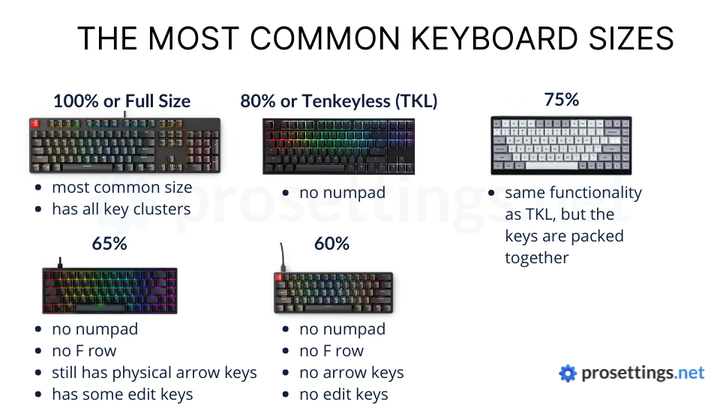
When upgrading your keyboard, size compatibility is everything. Not all keycaps fit every keyboard, especially when it comes to spacebars, shift keys, and layouts like 75%, 80%, or 100%.
Let’s break it down:
A typical full-size keyboard has 104 keys.
A 80% keyboard? Around 87 keys also known as a tenkeyless (TKL) keyboard.
That’s why understanding keycap size is essential — it helps you avoid returns, wasted money, and mismatched sets.
Next Layout:
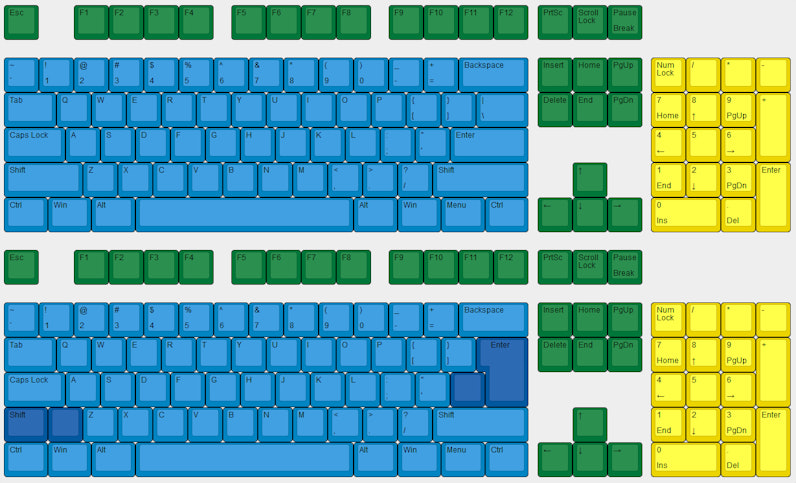
Standard layouts (like ANSI or ISO) generally use 1u for letters and modifiers, but larger keys like Shift (2.25u/2.75u), Spacebar (6.25u or 7u), and Enter (L-shaped or 1.25u) vary.
ANSI(Top) VS ISO(Down):
2. Understand Keycap Profiles
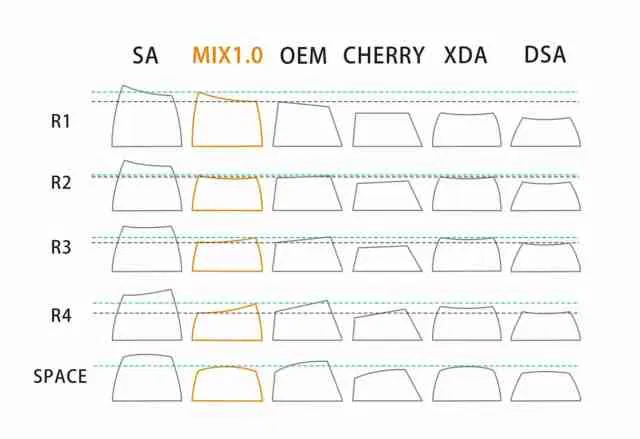
Keycap profile = shape and height of each row.
Common profiles:
OEM – standard and slightly curved
Cherry – shorter than OEM, very popular
SA – tall and sculpted
DSA – flat and uniform
Tips: Mixing profiles can look cool, but also feel weird. For a smooth typing experience, keep it consistent.
✅ Bonus: we’re happy to confirm fit before purchase — just contact us.
Styling Tips: Keycaps as Your Desk’s Centerpiece
Choosing the right size is just the beginning — style makes your keyboard shine.
Minimalist setup? Try our Hello Silver Set – clean, futuristic, perfect for silver or white boards.
Statement piece? Go for the Full Metal Set – bold, industrial, and guaranteed to draw attention.
Want a touch of color? Try combining one of our artisan spacebars with standard sets for contrast and flair.
Already using a TKL or 75% keyboard? Check out our Touch87 layout visual – perfectly matched with our metal keycaps.
Keycap upgrades should be exciting — not frustrating. A mismatched spacebar or missing key can ruin the whole look. That’s why Awekeys metal keycaps are engineered with both compatibility and aesthetics in mind.